Artificial intelligence is opening up new possibilities for how people interact with technology, learn new skills, and build solutions.
Instead of navigating through multiple screens, learning where every setting is located, or manually moving information from one system to another, users can increasingly describe what they need and let technology handle the steps behind the scenes.
At PDF Butler, we see this as an opportunity to make document automation more accessible and more connected to the way teams already work.
That is why we are expanding our AI capabilities across three different areas: using document automation through Slack, automating document requests received by email, and building PDF Butler solutions through AI assistants using our MCP server.
These capabilities address different parts of the document automation process, but they share the same goal: make it easier to turn information into action without unnecessary manual work.
Three ways AI connects with PDF Butler
PDF Butler’s three latest AI-driven capabilities reflect these different use cases:
- Slackbot Integration
- Email Operation
- MCP Server
Let’s take a closer look at each one.
1. Slackbot Integration
PDF Butler’s Slackbot integration brings Salesforce data, document generation, digital signing, and form generation into a single conversational experience within Slack.
Built in connection with Agentforce, Slackbot can interact with Salesforce through natural-language requests. Users can ask questions about customers, opportunities, cases, contracts, contacts, and other available Salesforce records, retrieve relevant information directly in the conversation, and access the corresponding Salesforce records.
The integration also allows users to trigger document-related processes through Slack.
With PDF Butler, users can request the generation of business documents such as proposals, quotes, reports, and other custom documents. The process uses the data and templates already configured in Salesforce and PDF Butler.
The workflow can also extend to digital signing and form generation. Users can initiate sign requests for documents associated with Salesforce records and generate forms through Dynamic Forms (FORM Butler) based on configured processes and relevant Salesforce data.
By bringing these capabilities together in Slack, users can retrieve Salesforce information, access related records, generate documents, launch signature requests, and create forms without leaving their Slack workspace.
2. Email Operation
Many document processes begin with a request from a customer or an internal team member. Processing these requests can involve collecting information, preparing a document, and generating the final file.
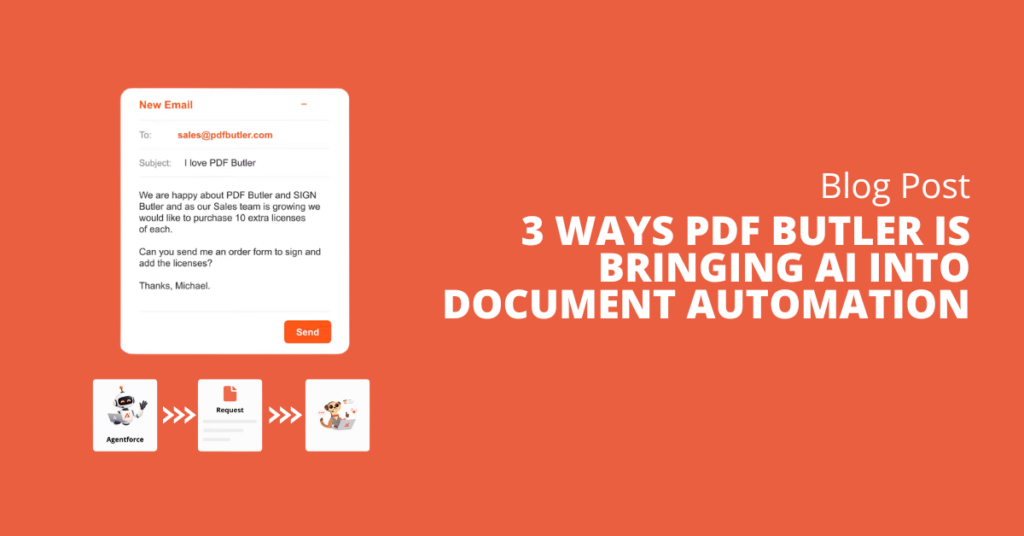
PDF Butler’s Email Operation makes it possible to receive requests directly by email and use the information provided to automatically generate a quote, proposal, or another document configured in PDF Butler.
The process can be tailored to each organization’s needs. For example, a customer can send an email containing the information required to request a quote. PDF Butler identifies the relevant details in the message, applies the predefined configuration, and creates the appropriate document without requiring someone to collect the data, prepare a template, or generate the file manually.
The workflow can also include the automatic creation of a sign request. The request can be sent to the person who submitted the original email or to another recipient defined in the process.
This allows an incoming email request to initiate a workflow that generates the required document and sends it for signature.
By reducing repetitive administrative work and manual information transfer, Email Operation helps teams process routine requests more efficiently, reduce the risk of errors, and spend more time on cases that require personalized attention. Customers can also receive a faster response without having to wait for a team member to be available.
3. MCP Server
While Slackbot integration and Email Operation focus on interacting with Salesforce and automating document workflows, PDF Butler’s MCP server focuses on making document automation easier to build and configure.
The MCP server can be integrated with Claude, ChatGPT, and other AI engines, allowing users to interact with PDF Butler through natural language. Instead of needing to understand every technical detail from the beginning, users can describe what they want to accomplish and receive assistance in creating the appropriate configuration.
For example, a user can ask an AI assistant to create a Document Configuration for a quote, contract, invoice, proposal, or another document process. The AI can interpret the request and help generate the appropriate Doc Config directly within PDF Butler.
The capabilities extend beyond basic Document Configurations. When a Doc Config requires additional components, the AI can also assist in creating Data Sources, Actionables, and custom code.
This makes it possible to work on more complete automation flows. If a document needs to retrieve information from different Salesforce objects, apply specific business logic, trigger actions, or transform data before generating the final output, the AI can help identify the required setup and generate the relevant configuration. When additional customization is needed, it can also help create the necessary code.
Beyond configuration
PDF Butler’s vision for AI extends beyond generating configurations. Through dedicated AI skills, users can receive help navigating the PDF Butler Academy, finding relevant documentation, understanding best practices, and getting contextual guidance throughout the configuration process.
Rather than simply providing an answer, these skills can guide users toward relevant resources and help them make better decisions while building their automation.
Over time, this approach can extend across the wider PDF Butler product ecosystem, making features easier to discover, understand, configure, and use.
Bringing AI Closer to Document Automation
These three capabilities demonstrate different ways AI can support document automation within the PDF Butler ecosystem.
Slackbot integration enables users to interact with Salesforce data and trigger document, signature, and form workflows through natural language.
Email Operation automates the process of receiving document requests by email, generating the required documents, and initiating signature workflows when configured.
The MCP server helps users build PDF Butler configurations and supporting components through AI assistants, with additional guidance available through dedicated skills.
Together, these developments reflect PDF Butler’s approach to AI: helping users access information, automate document processes, and build more advanced solutions through more accessible interactions.
By combining its document automation platform with AI-driven assistance, PDF Butler aims to reduce the time required to implement document processes, make advanced automation accessible to a broader range of users, and help customers get more value from the platform.
This is an ongoing development, with the ambition to extend AI-driven assistance across more of the PDF Butler ecosystem over time.