October updates focus on improving the signing experience, expanding document configuration options, and making collaboration components accessible in more languages.
Here’s a closer look at the new features, improvements, and fixes included in the October release.
Digital Signature (SIGN Butler V2)
Current version: v1.315
Download URL: /packaging/installPackage.apexp?p0=04tWU000000WfL1
- New Feature: Warning for Multiple Signing Sessions
SIGN Butler V2 now displays a warning when a user attempts to open the same Sign Request in multiple instances, such as on a PC and a phone. This helps prevent edge cases where data could be missing from the Audit Trail or signers were required to sign twice.
- New Feature: Timeout on the Signing Page
For security reasons, the signing page now includes a default timeout, similar to those used on banking websites. Users have 15 minutes to read and sign a document. V At minute 13, a pop-up asks whether the user wants to extend the session.

What can happen?
- If the user clicks Yes: The session is extended by another 15 minutes.
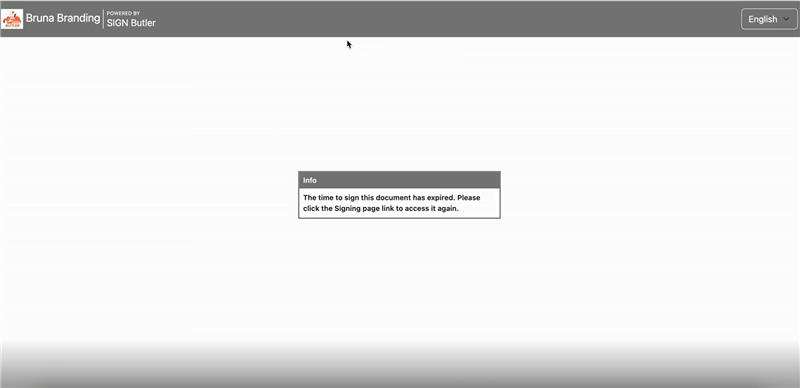
- If the user clicks No or gives no response: The session is not extended, and the following message is displayed: “The time to sign this document has expired. Please click the Signing page link to access it again.”
Translations Labels:
- “error-signing-time-expired“: “The time to sign this document has expired. Please click the Signing page link to access it again.”
- “signing-time-expiry-warning“: “Dear user, you only have 2 minutes remaining to Sign your document. Would you like to extend your time?”
- Fix: Missing Actions in the Audit Trail
We updated the logging process to ensure that previously missing actions are recorded in the Audit Trail. All actions are now logged as expected.
- Fix: Custom Branding for Completed and Closed Sign Requests
Custom branding is now displayed correctly when a Sign Request is revoked, rejected, signed, or expired. No action is required.
- Fix: Zoom on PC and Mac
An issue that prevented users from zooming in and out of documents on the signing page on PCs and Macs has been resolved. Users can now zoom in and out of PDFs as expected. The mobile experience remains unchanged.
Document Generation (PDF Butler v1.550)
Current version: October 20, 2026
Download URL: /packaging/installPackage.apexp?p0=04tQy000000aPd2
- New Feature: Excel Column Remover
You can now use the COLUMN_REMOVER Config Type in Excel Doc Configs to remove columns.
For setup instructions, see the article: EXCEL DC – COLUMN_REMOVER Config Type – PDF Butler
Note: this is the first version of the feature. It works differently from the corresponding feature for Word Doc Configs.
- New Feature: Additional Fields for ZUGFeRD Doc Configs
ZUGFeRD Doc Configs now support Credit Transfers (Type Code 59). Administrators can map the Creditor Reference ID. If this field is empty, Type Code 58 is used by default.
Support has also been added for the Bank IBAN and Mandate Reference fields for the debtor.
- Fix: Picture Config Type in a Sheet Config Type
An issue affecting the Picture Config Type when used within a Sheet Config Type has been resolved. The configuration now works as expected.
Document Management (Collaboration Butler)
Current version: v1.239 (released)
Download URL: /packaging/installPackage.apexp?p0=04tWV0000007fCv
- New Feature: Additional Language Support
New translations have been added for Collaboration Butler components, including the email composer. English, Spanish, French, German, Dutch, and Japanese are now supported by default.
What’s Coming Next?
Here’s what we’re working on for upcoming releases:
Document Generation (PDF Butler)
- New features for Excel and static PDF Doc Configs.
- Our third text processor will become available.
Dynamic Forms (FORM Butler)
- Improved error handling to give administrators more information about the reasons behind potential errors.
Digital Signature (SIGN Butler V2)
- An optional guided signing process designed to guide signers through the required actions.
These updates continue to improve document configuration, signing security, and the overall user experience across PDF Butler solutions. Keep an eye out for the next release notes to see what’s coming next.