
The Excel Column Remover Config Type allows you to dynamically remove columns from generated Excel documents based on configured criteria.
This feature is useful when certain information should only appear when specific conditions are met. For example, you may want to hide the Amount column whenever its value is 0, producing a cleaner and more relevant document.
When the configured criteria evaluate to true, PDF Butler removes the selected column and automatically shifts the remaining columns to the left.
How It Works #
During document generation, PDF Butler evaluates every Column Remover Config Type before processing any Excel Regions.
If the configured criteria are met:
- The selected column is removed.
- Remaining columns shift to the left.
- Merge fields contained in the removed column are ignored during Region processing.
- The document continues generating without errors.
If the criteria are not met, the Excel document is generated exactly as designed.
Configuration Requirements #
Before creating a Column Remover, keep the following requirements in mind:
- A Column Remover must be created as a sibling of a Region Config Type. It cannot be created as a child of a Region.
- At least one Criteria is mandatory.
- During generation, PDF Butler shifts the remaining columns to the left.
- When column widths differ, the resulting column preserves the largest width between the removed and shifted columns.
Creating a Column Remover #
- Navigate to the Excel Doc Config where you want to conditionally remove a column.
- Create or select the Region Config Type that contains the Excel cells you want to process.
- Create a new Column Remover Config Type.
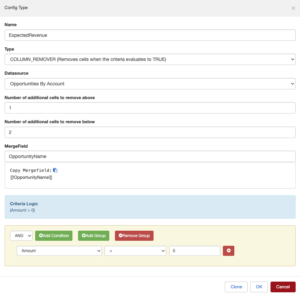
- Configure the cells that should be removed, including any cells above or below the target column if required.
- Add the condition that determines whether the column should be removed.
When this condition evaluates to true, the configured column will be removed from the generated Excel document.
- Save your configuration.
- Generate the Excel document as usual.
Multiple Column Removers #
A single Excel document may contain multiple Column Remover Config Types.
Each Column Remover:
- evaluates its own criteria independently;
- removes only its configured column when the criteria are met;
- does not affect the evaluation of other Column Removers.
This allows complex templates where different columns appear or disappear depending on the generated data.


