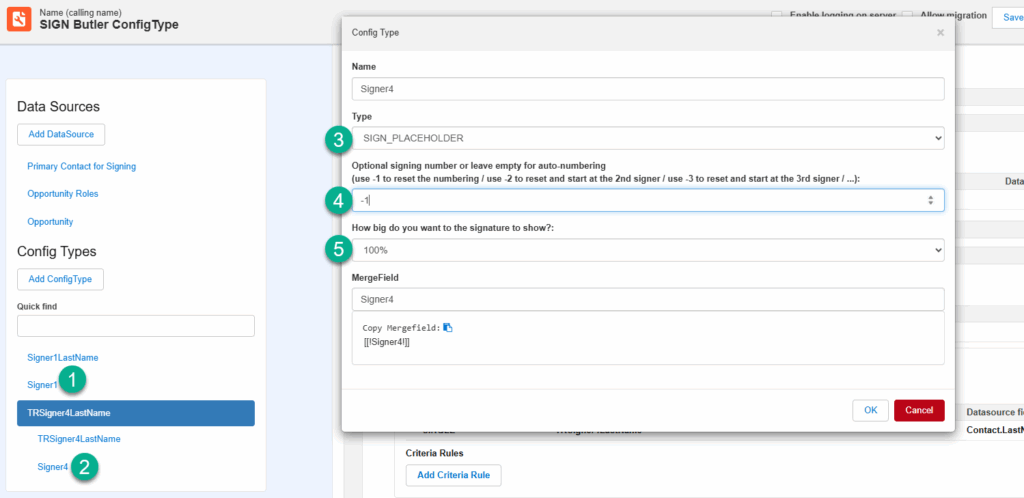
The best practice when the PDF is generated with PDF Butler is to use the SIGN_PLACEHOLDER ConfigType. This ConfigType will automatically add the SIGN Butler signature placeholder and has many useful features like an auto-counter to add the correct placeholder when you have multiple signers and process them in a loop eg Table or TableRow
Here is an overview of the usage:
- In this example i have a top-level SIGN_PLACEHOLDER ConfigType that will get the number 1 automatically. If there are more SIGN_PLACEHOLDER ConfigTypes, then the next one will receive number 2
- There is a SIGN_PLACEHOLDER ConfigType that is a child of a TABLE_ROW and will repeat for each record in the LIST DataSource
- For my ConfigType, select type “SIGN_PLACEHOLDER”
- If you want to re-start the numbering from 1, use “-1” here. Remember that in this example, there was already a SIGN_PLACEHOLDER ConfigType and if I do not reset, it will continue counting with Signer 2
- There are multiple sizes in which you can show the signature placeholder: 100%, 75%, 50% or 25%