
Contract Butler – Working with a Contract from a Record #
Contract Butler integrates directly with Salesforce records, allowing you to create Contract Instances and generate contract documents without leaving the record page.
In this example, the process is demonstrated using an Opportunity record, but the same workflow can be configured for other supported Salesforce objects.
Setting Up #
- Navigate to the Opportunities tab.
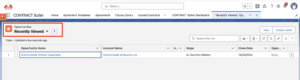
- Open the Opportunity you want to work with.
If Contract Butler has been configured correctly, you will see the following actions on the record:
Create Agreement (1)
Generate PDF (2)
These actions streamline the contract creation and document generation process directly from the Opportunity.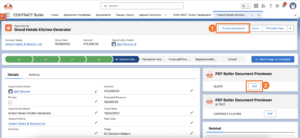
- Click Create Agreement to begin creating a new Contract Instance associated with the current Opportunity.
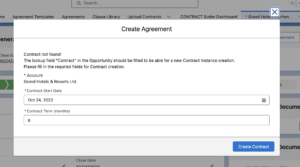
The view of the opened modal window depends on some conditions. If there is no Contract related to the Opportunity the user needs to perform the following actions:Scenario 1 – No Contract Exists
#If the Opportunity does not yet have a related Contract, you must first create one.
Complete the following fields:
Account: If the Opportunity does not already contain an Account, select one. If an Account is already associated with the Opportunity, its name will be displayed automatically.
Contract Start Date: Select the date on which the contract should begin.
Contract Term: Specify the contract duration (for example, the number of months).
Create Contract
After completing the required information, click Create Contract.
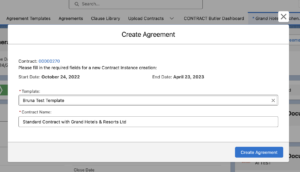
You will see the Create Agreement window. The Contract Instance window displays information from the newly created Contract. Here you can review and configure additional details before creating the Contract Instance.
Complete the following fields:
Template: Select the Agreement Template that will be used to generate the contract.
Contract Instance Name: Automatically generate the name or enter a custom name.
Click Create Agreement.
Scenario 2 – Contract Exists but No Contract Instance #
If the Opportunity already has a related Contract but no Contract Instance has been created, Contract Butler opens the Create Agreement window directly.
Simply complete the required fields and create the Contract Agreement.Scenario 3 – Contract and Contract Instance Already Exist
#If both a Contract and a Contract Agreement already exist for the Opportunity, Contract Butler displays a dialog containing links to both records.
- When a new Contract and Contract Agreement are created, Contract Butler automatically updates the related records.
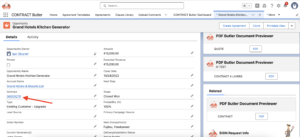
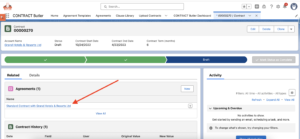
- Return to the Opportunity.
- Click Generate PDF.


