PDF Butler – SINGLE Config Type Text Formatting #
The SINGLE Config Type includes text formatting options that can be used to automatically adjust and standardize data formatting during document generation.
This feature is especially useful when:
- Salesforce data is inconsistently formatted
- Text casing needs correction
- Values should follow a standardized format in generated documents
Examples:
- Converting text to uppercase
- Capitalizing words
- Formatting lowercase text
- Applying consistent styling to output values
1. Create the Doc Config #
- Create a new Doc Config.
- Upload your document template if required.
2. Add the Data Source #
- Open the PDF Butler Editor.
- Add the required Data Source to the configuration.
3. Create a SINGLE Config Type #
- Click Add Config Type.
- Select:
- Type =
SINGLE
- Type =
- Configure the required merge field and field mappings.
4. Configure Text Formatting #
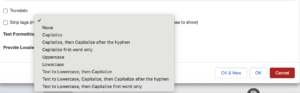
- Locate the Text Formatting section in the Config Type settings.
- Select the formatting option you want to apply.
Examples may include:
- Uppercase
- Lowercase
- Capitalize
5. Select a Formatting Option #
- Choose the desired option from the dropdown list.
- Confirm the formatting matches your document requirements.
6. Save the Configuration #
- Click Save to Server.
7. Generate and Validate the Document #
- Generate the document from Salesforce.
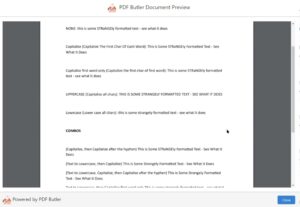
- Verify that the text is formatted according to the selected option.
Example:
john doe→JOHN DOEsalesforce opportunity→Salesforce Opportunity