
When working with large Data Sources, it is common to retrieve many fields even though only a small number are actually used in the document. Retrieving unnecessary fields can increase document generation time.
The SOQL Field Rewrite feature automatically analyzes your Doc Config and rewrites the Data Source query so that only the fields used by the document are retrieved. This improves performance while allowing you to continue using the same reusable Data Source across multiple Doc Configs.
Example
A single Opportunity Data Source may contain 100 fields because it is shared across multiple document templates. If your current Doc Config only uses 12 of those fields, PDF Butler can automatically retrieve only those 12 fields, reducing query size and improving document generation performance.
Before You Begin #
This feature is controlled by the Salesforce field:
Rewrite_SOQL_From_DS_Fields__c
This field must be enabled on the Doc Config record.
Note
If this field is False or does not exist on the Doc Config, the SOQL Field Rewrite functionality is disabled and the related options will not be displayed in the PDF Butler Configuration page.
Enable SOQL Field Rewrite #
- Open your Doc Config record in Salesforce.
- Using Salesforce Inspector, locate the field Rewrite_SOQL_From_DS_Fields__c.
- Set the value to True.

- Save the record.
Once enabled, additional SOQL optimization options become available in the PDF Butler Configuration page.
Configure a Data Source #
- Open the PDF Butler Configuration page.
- Open the desired Doc Config.
- Open one of the configured Data Sources.
-
If SOQL Field Rewrite is enabled, a new checkbox is displayed:
Ignore this DataSource for SOQL Field Overwrite
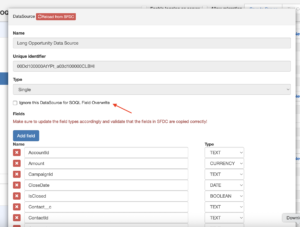
- Decide how you want this Data Source to behave:
Option 1 – Leave the checkbox unchecked. #
When left unchecked:
- PDF Butler automatically detects the fields used in the configuration.
- Only those fields are retrieved from Salesforce.
- Document generation is faster.
Option 2 – Check the checkbox #
When enabled:
- PDF Butler ignores the SOQL optimization.
- The original Data Source query is executed.
- All fields defined in the Data Source are retrieved.
- Configure your Config Types as usual.
- Save the Doc Config.
- Generate the document.
Limitations #
The Ignore this DataSource for SOQL Field Overwrite option is not available for:
- Filtered Data Sources
- Dynamic Picture Data Sources
These Data Source types always use their existing behavior.
Benefits #
Using SOQL Field Rewrite provides several advantages:
- Faster document generation.
- Smaller SOQL queries.
- Reduced unnecessary field retrieval.
- Better performance when working with large reusable Data Sources.
- Allows a single Data Source to be reused across multiple Doc Configs without sacrificing performance.
Best Practices #
- Enable SOQL Field Rewrite whenever possible for large Data Sources.
- Leave Ignore this DataSource for SOQL Field Overwrite unchecked unless there is a specific reason to retrieve all fields.
- Reuse Data Sources across multiple Doc Configs while allowing each document to retrieve only the fields it actually needs.
- After modifying Config Types or adding new merge fields, save the Doc Config so the selected field list is updated before generating documents.


