
A Static Values Data Source allows you to define fixed values that can be used across one or more PDF Butler document configurations without writing Apex code or retrieving data from Salesforce objects.
For instance company addresses, names of persons, … . Keep them in an easy to manage and re-usable Static datasource and use them in multiple templates.
Creating a Static Values Data Source #
- Navigate to Data Sources.
- Click New.
- Select Static Values as the data source type.
- Enter a name for the data source.
- Save the record.
After saving, the data source includes a component where you can define your static values.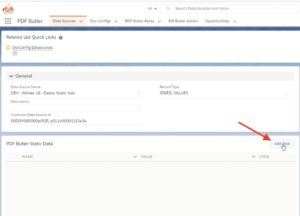
Adding Static Values #
The Static Values component allows you to create multiple key/value pairs.
For each value:
- Add a new row.
- Enter the field name.
- Enter the corresponding static value.
- Save your changes.
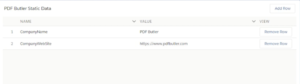
These values become available for use throughout your PDF Butler configurations.
Adding the Data Source to a DocConfig #
After creating the Static Values Data Source:
- Open your DocConfig.
- Add the Static Values Data Source.
At this stage, you may notice that no fields are automatically available.
Currently, the fields defined in a Static Values Data Source are not automatically imported into the Document Configuration.
To use the static values:
- Manually create a configuration field for each static value.
- Ensure the field names exactly match the keys defined in the Static Values Data Source.
- Save the configuration.
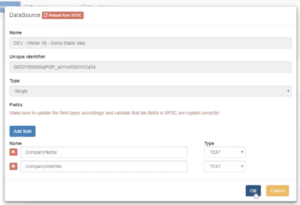
Once created, these fields can be selected in Config Types and Merge Fields like any other data source field.


