
The Overwrite Packs feature allows you to use a document edited in the Document Editor as an overwrite document for a Pack’s leading DocConfig.
When a Pack is configured in the Overwrite Packs setting, the edited DOCX document replaces the leading DocConfig during document generation while preserving the remainder of the Pack configuration.
This allows users to edit a document before generation while still combining it with additional documents configured in the Pack.
How It Works #
Normally, a Pack generates documents using its configured DocConfigs.
With Overwrite Packs, the workflow changes slightly:
- A user generates and edits a document in the Document Editor.
- The edited DOCX becomes the overwrite document.
- When generating through an eligible Pack, PDF Butler replaces the Pack’s leading DocConfig with the edited document.
- Any additional DocConfigs in the Pack are still generated and merged as usual.
Configure Overwrite Packs #
- Go to Setup and click to “Edit Page”
- Find the Document Editor component and drop it into the page layout.
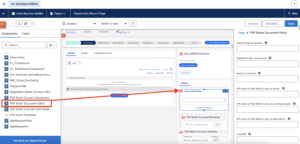
- Open the Document Editor configuration.
- Inform all the DocConfigs and Packs ID’s you would like to retrieve.
- Locate the Overwrite Packs field.
- Enter the ID of the Pack that should use the edited DOCX as an overwrite document.
Only the Packs listed in this setting will use the overwrite functionality.
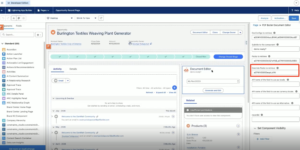
- Save it.
After editing the document:
- Click Generate and Edit as usual.
- Select one of the Packs configured in Overwrite Packs.
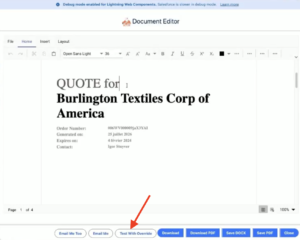
- Generate the document.
When the user generates the document using the configured Pack:
- The edited Document replaces the leading DocConfig.
- The Terms and Conditions document is still generated normally.
- PDF Butler merges both documents into a single output.
The edited DOCX can still contain merge fields.
After generation, you can verify the output by reviewing the generated document (for example, in Notes & Attachments or your configured storage location).
The final document should include:
- The changes made in the Document Editor.
- Content generated from the additional DocConfigs in the Pack.
- Any remaining merge fields correctly resolved.


